
Modeling Overview
Turn raw source tables into business-friendly structures that people and the AI service can both understand.
Modeling in NQRust Analytics is where you reshape raw source tables into structures that match how your business thinks about its data. The result is easier for people to explore and clearer for the AI service to reason about when it generates SQL.
Everything you define here is captured in MDL, the semantic layer that grounds the platform's answers.
What you work with on the Modeling page
Models
Models are the core building block. A model combines a table's structure, metadata, relationships, calculated fields, and other semantic details so the underlying data is easier to query and explore.
See Models for details.
Views
Views are virtual tables built on top of existing models. They let you save and reuse query logic without copying the underlying data. Use the Save as view action to preserve a result as a view.
See Views for details.
Relationships and the ERD
The Modeling page shows an entity relationship diagram (ERD) of your models, views, and how they connect. Models appear in blue and views appear in green, so you can distinguish the two at a glance.
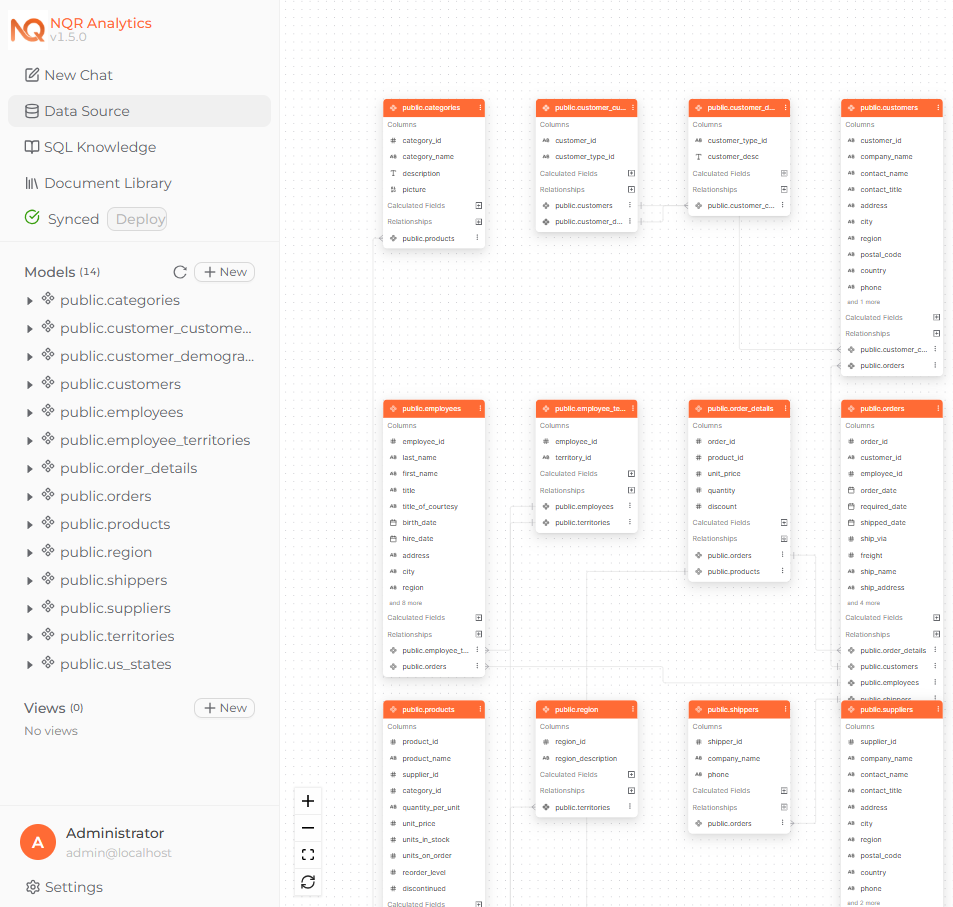 The Modeling page showing the ER diagram canvas with models in blue and views in green, connected by relationship lines.
Next steps
Models
Define and manage the datasets behind your analytics.
Model Metadata
Add aliases and descriptions that give the AI service business context.
Calculated Fields
Build reusable logic with spreadsheet-style expressions.
Expression Reference
Every function you can use in a calculated field.
Relationships
Connect models so queries can join them reliably.
Views
Save trusted query results as reusable virtual tables.