
Asking Questions
Ask questions about your data in plain language and let NQRust Analytics turn them into answers.
From the Home page, describe what you want to know in plain language. NQRust Analytics responds with an AI-generated answer drawn from your data.
Recommended questions
When you open the Home page, NQRust Analytics presents a set of suggested questions in the center of the screen. These suggestions are derived from your data models, including the semantics and relationships you have defined. Use them to begin exploring and to surface insights you might not have thought to look for.
Asking a question
Type your question into the question box and press Ask.
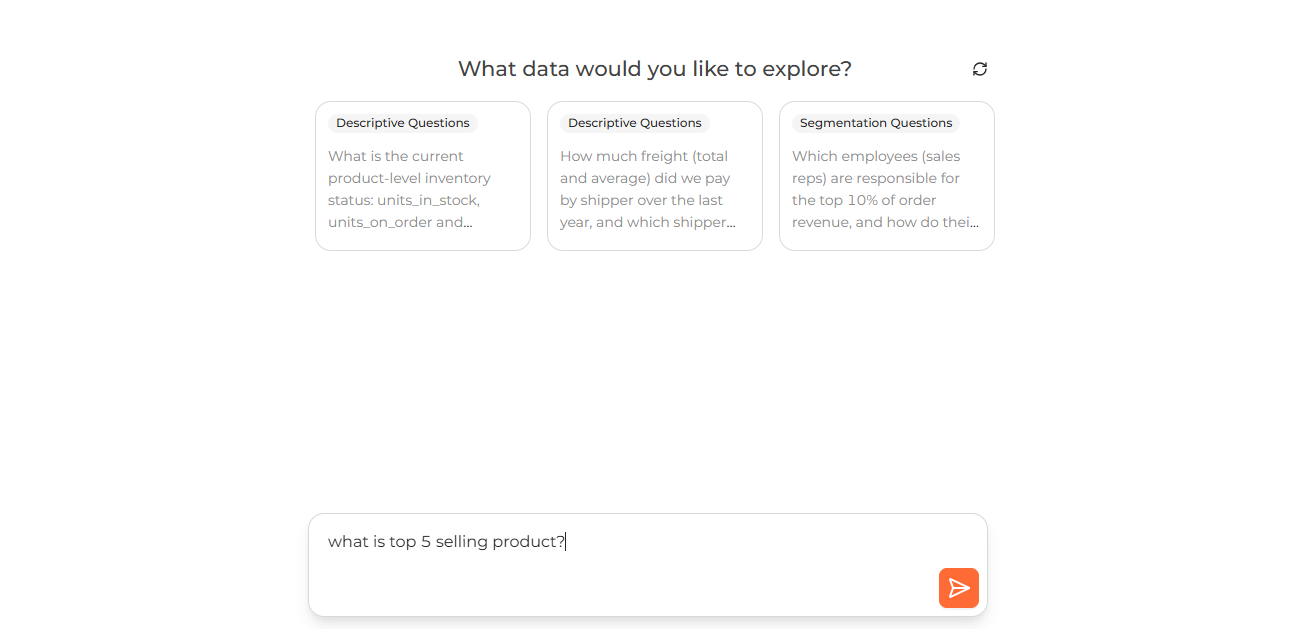 The Home page ask box with a plain-language question typed in and the Ask button
NQRust Analytics sorts every request into one of three categories so it can respond appropriately: data retrieval requests, schema exploration, and out-of-scope queries. If it cannot produce a query for what you asked, it will suggest how to reword the question.
Data retrieval requests
These are well-defined questions that map cleanly onto a SQL query. For this kind of request, NQRust Analytics returns:
- A short summary of the insights found in your data
- A chart visualization when the result lends itself to one
- The option to inspect the SQL that produced the answer
- The option to adjust the answer
If the question is precise, you receive a summarized answer with the relevant data. If it is vague, NQRust Analytics requests more detail and proposes alternative phrasings.
Database schema exploration
You can also ask about the structure of your database itself, for example which tables exist, how a table is structured, or how tables relate to one another. This helps you understand and navigate your schema.
Examples you can try:
- "What tables do I have?"
- "What can I ask?"
- "Explain the customer table to me."
- "How many tables do I have?"
Alongside the answer, NQRust Analytics provides follow-up questions you can turn into queries.
Out-of-scope questions
Inputs that have nothing to do with your schema or with retrieving data, such as greetings or requests outside the platform's purpose, fall into this category. When this happens, NQRust Analytics explains why it cannot answer and lists recommended questions that may be closer to what you intended.
When you are asked to clarify
If your question is unclear or unrelated to your data, you may see a Clarification needed prompt. Rephrase the question to make it more specific or relevant. NQRust Analytics explains why it could not answer.
When your question resembles a query from a saved view, NQRust Analytics searches your saved views first. If no related SQL is found among them, it generates SQL from the context it has gathered.
Answer details
Once an answer is generated, you are taken to a thread page where you can review the full details.
Follow-up questions
Within a thread, continue asking follow-up questions to refine your request step by step and arrive at more precise results.