
Managing Access
Assigning roles to users and understanding project-level ownership in NQRust Analytics.
Access in NQRust Analytics is managed at two levels: global roles assigned to users, and project membership assigned per project. This page explains who can change each, based on the enforcement in the code.
Assigning roles to users
Global roles (admin, editor, viewer, plus any custom roles) are assigned
through the User Management area. Creating users, updating their roles, and
deleting users are all admin-only operations.
Every user-management mutation requires the caller to hold the admin role.
The same goes for role management — creating, updating, and deleting roles all
require admin. In effect, only holders of the user / role admin capability
(the admin role) can manage users and roles.
The User Management page itself is gated behind an admin check, so non-admin users cannot open it.
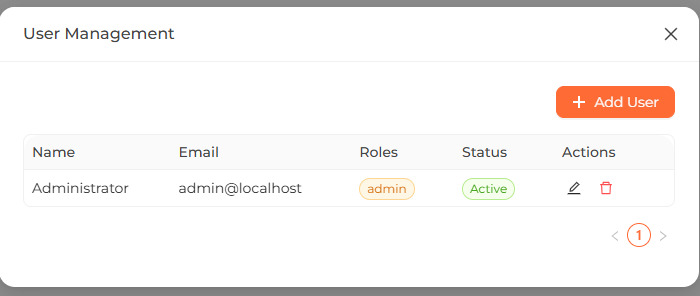 The User Management screen listing users with their assigned roles.
When an admin creates a user, they can assign one or more roles at creation time, and can change a user's roles later by updating the user. Removing a role revokes the permissions that role granted.
Several server-enforced safeguards apply:
- An admin cannot delete their own account.
- System roles cannot be modified or deleted (see Roles). Custom roles can be edited and removed.
Project-level ownership
Separate from global roles, each project has its own membership list. A project member has one of three project roles:
| Project role | Capability in code |
|---|---|
| owner | Full control of membership — can invite, change roles, and remove members. |
| editor | Can invite members (treated as able to edit the project). |
| viewer | Member with access, but cannot manage other members. |
Project membership is stored independently from global roles. The seeded
admin@localhost user is made the owner of an existing project at install
time, but in general a user's project role is not tied to their global role.
Who can do what on a project
The membership mutations enforce these checks:
- Invite a member — requires the caller to be able to edit the project,
i.e. an
owneroreditormember. - Change a member's role — restricted to the project owner only.
- Remove a member — restricted to the project owner only.
Ownership can also be transferred: the current owner is demoted to editor and the chosen member is promoted to owner.
Project roles (owner / editor / viewer) are a different set from the
global roles. A user could be a global viewer yet still be the owner of a
specific project, or vice versa.
Where access is enforced
Access checks live in two places:
-
Client-side route guards. Pages are wrapped so that they redirect away unless the signed-in user is authenticated and holds the required permission (or is an admin). For example, the modeling page requires
model:read, the SQL-pairs page requiressql_pair:read, the instructions page requiresinstruction:read, and User Management requires admin. -
Server-side resolver checks. Authentication is required for the GraphQL API, and the sensitive auth, user, and role mutations explicitly require the admin role. Project membership mutations enforce the owner/editor checks described above.